Prompt Versioning for Agentic Systems: 5 Mistakes to Avoid
 Dmytro Chaban
Around half a year ago, I started working intensely on different types of agentic systems—from customer-facing support bots to complex developer agents. One problem kept showing up.
It wasn't the model's intelligence. It wasn't the context window limits.
It was prompt management.
If you've built a production agent, you've felt it. You tweak a prompt to fix one edge case, and suddenly the agent forgets how to use tools. You copy a prompt into a Word doc to "save it," and smart quotes break your JSON formatting. You have 20 agents that all need the same "Company Terms" update, and you miss one.
Here are the 5 biggest mistakes I made (and saw others make) while managing prompts for production agents, and how to fix them.
Key Takeaways#
- Treat prompts as code: Version them strictly. Never rely on "Final_v2.txt" files.
- Stop using Word docs: Formatting symbols like smart quotes can break tool calling and agent logic.
- Use deployments: Point your agents to a "Live" or "Latest" tag, not a hardcoded text block, to enable zero-downtime rollbacks.
- Externalize prompts: Don't hide prompts inside tools like n8n or ElevenLabs where you can't track changes.
- Go modular: Use prompt injection to manage shared rules (like security or terms) across multiple agents from a single source of truth.
The Chaos of Production Agents#
The "It Worked on My Machine" of Prompts#
When you're building a simple chatbot, keeping the prompt in your code or a config file is fine. But when you move to agentic systems—where agents call tools, interact with APIs, and handle complex customer queries—precision is everything.
A single changed character can stop an agent from triggering a tool. A missing newline can confuse the model about where instructions end and context begins.
Real-World Horror Stories: The n8n Crash & The Untested Q&A#
I've learned these lessons the hard way.
The n8n Formatting Disaster: We had a prompt living inside an n8n node. A team member copied it out to a Word document to edit it, then pasted it back. It looked fine to the human eye. But the editor had replaced standard quotes with "smart quotes" and altered the newlines. The result? The agent completely broke, failing to parse JSON responses for hours until we found the "invisible" syntax error.
The Untested Q&A Drift: Another time, a Q&A agent (powered by Claude) was updated with a "refactored" prompt that was supposed to be cleaner. It was pushed live without a staged deployment. The new prompt was indeed shorter, but it skipped a few critical details about our refund policy. The agent started promising customers refunds that didn't exist, leading to a massive drift in conversation quality and some very angry support tickets.
These weren't model failures. They were process failures.
Mistake 1: The "Final_Final_v2.txt" Syndrome#
Why Text Files Fail at Scale#
The most common mistake is managing prompts like they are just text notes. You might have a folder on your desktop or a shared Drive with files named agent_prompt_v1.txt, agent_prompt_v2_fix.txt, agent_prompt_final.txt.
This works for a week. Then you forget which "final" is actually running in production.
The Need for Immutable History#
Prompt versioning needs to be strict. You need to know exactly what changed between Version 12 and Version 13.
In a proper system, every save creates an immutable version. You don't overwrite the file; you create a new record. You can:
- Diff changes: See exactly what words were added or removed.
- Revert instantly: If V13 breaks, switch back to V12 in seconds.
- Audit trails: Know who changed the prompt and why.
Mistake 2: Treating Prompts as Prose, Not Code#
The Hidden Cost of Formatting (Smart Quotes & Newlines)#
Prompts are not literature. They are natural language code.
When you treat them as prose—editing them in Google Docs, Slack, or Notion—you introduce formatting artifacts.
- Smart Quotes:
“vs"(The model often treats these differently, especially in JSON). - Whitespace: Extra spaces or missing newlines can break the delicate structure required for Function Calling.
- Markdown: AI models rely heavily on Markdown headers (
#,##) to understand hierarchy. Rich text editors often strip these or convert them to visual styling.
How a Copy-Paste Can Break Tool Calling#
For agentic systems, tool definitions are often injected into the prompt. If your editor "autocorrects" a dash to an em-dash, or changes the indentation of a YAML block, the agent will hallucinate tool parameters or fail to call the tool entirely.
Rule: Always edit prompts in a code-safe environment (a code editor or a specialized Prompt Studio) that preserves raw text integrity.
Mistake 3: Lack of Deployment Pointers#
The "Live" vs. "Latest" Dilemma#
You're working on a new feature. You edit the prompt. If your agent reads directly from that "current" file, you just pushed untested code to production.
Decouple the editing from the serving.
Implementing Zero-Downtime Rollbacks#
Deployments solve this.
- Version 12 is what you just wrote.
- "Live" Tag points to Version 10.
Your production agents query the prompt by the Live tag. Iterate on Version 11 and 12 safely in staging. When ready, move the Live pointer to Version 12.
Version 12 breaks? Point Live back to Version 10. No copy-pasting, no panic editing. Just a pointer switch.
Mistake 4: Hiding Prompts in Workflow Tools#
The Observability Black Hole (n8n, ElevenLabs)#
Tools like n8n, Make, or ElevenLabs are fantastic for orchestration, but terrible for prompt management.
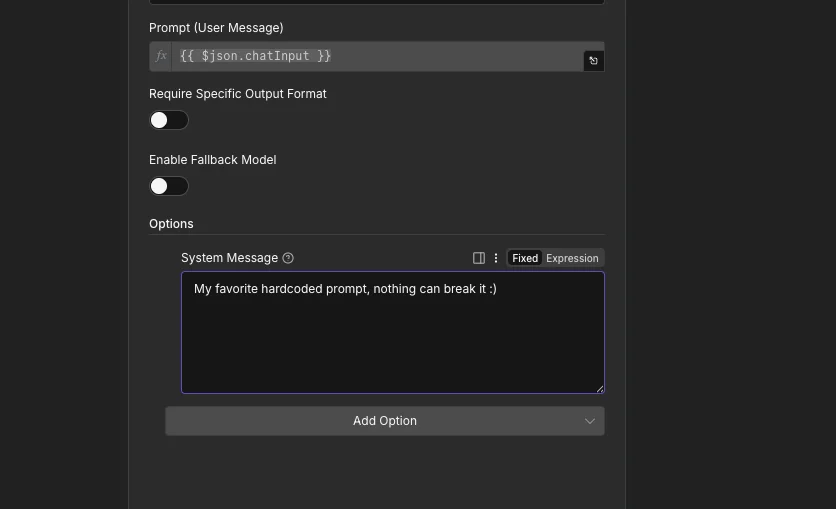
When you hardcode a system prompt inside an n8n "AI Agent" node, it becomes a black hole.
- Who changed it? You don't know.
- What was the previous version? It's gone.
- Can I reuse this prompt in another workflow? No, you have to copy-paste it.
Decoupling Logic from Instruction#
Keep your logic (the workflow) separate from your instruction (the prompt).
Use a specialized node or HTTP request to fetch the prompt from your source of truth (GitHub or a Prompt Management System) at runtime.
- Workflow starts.
- Fetch Prompt:
GET /prompts/customer-agent/deployments/live - Run Agent: Use the fetched string.
Update the agent's behavior without touching the production workflow. Fix a hallucination in the prompt while the n8n workflow stays locked and stable.
Mistake 5: The Drift of the 20 Agents#
The Impossibility of Manual Rule Enforcement#
When you scale from 1 agent to 20, you hit the consistency wall.
Let's say you have a company policy: "We do not offer free rides unless the user has a Gold status." You add this to your Support Agent. Great. But what about the Sales Agent? The Refund Agent? The Onboarding Agent?
Manually copy-paste this rule into 20 different text files, and you will miss one. That one agent starts promising free rides. Liability.
Solving Consistency with Modular Prompts#
Modular prompts or "prompt injection" fixes this.
Create a single "Master Policy" prompt. Inside your 20 specific agent prompts, inject it:
You are a Sales Agent. Your goal is to...
Update the company_policy module once. All 20 agents inherit the new rule on their next run. Your source of truth stays actual truth.
The Solution: Centralized Prompt Management (Prompt Studio)#
Why I Built It#
After months of broken JSON, lost versions, and inconsistent agents, treating prompts as text files hit a wall. I needed a tool that treated prompts as software artifacts.
So I built Prompt Studio.
It handles the boring stuff:
- Strict Versioning: Every save is a new immutable version.
- Deployments: Tag versions as
dev,staging, orprodand fetch them via API. - Modular Components: Define a block once and inject it into unlimited agents.
- Code-First Editor: No smart quotes, no hidden formatting. What you see is exactly what the LLM gets.
Use Prompt Studio or build your own git-based solution. Either way: Prompts are code. Manage them that way.